
Compare metrics in one view
Place related variables in the same time range instead of switching between multiple views.
See not only the outcome but how it was achieved. Retain every action, process response, and optimization result so experience can be reviewed, shared, and reused.
Tuning records connect tasks, candidate parameters, objective evaluations, and final results. With time-series analysis, teams can trace conclusions back to the process and understand what worked and when anomalies appeared.
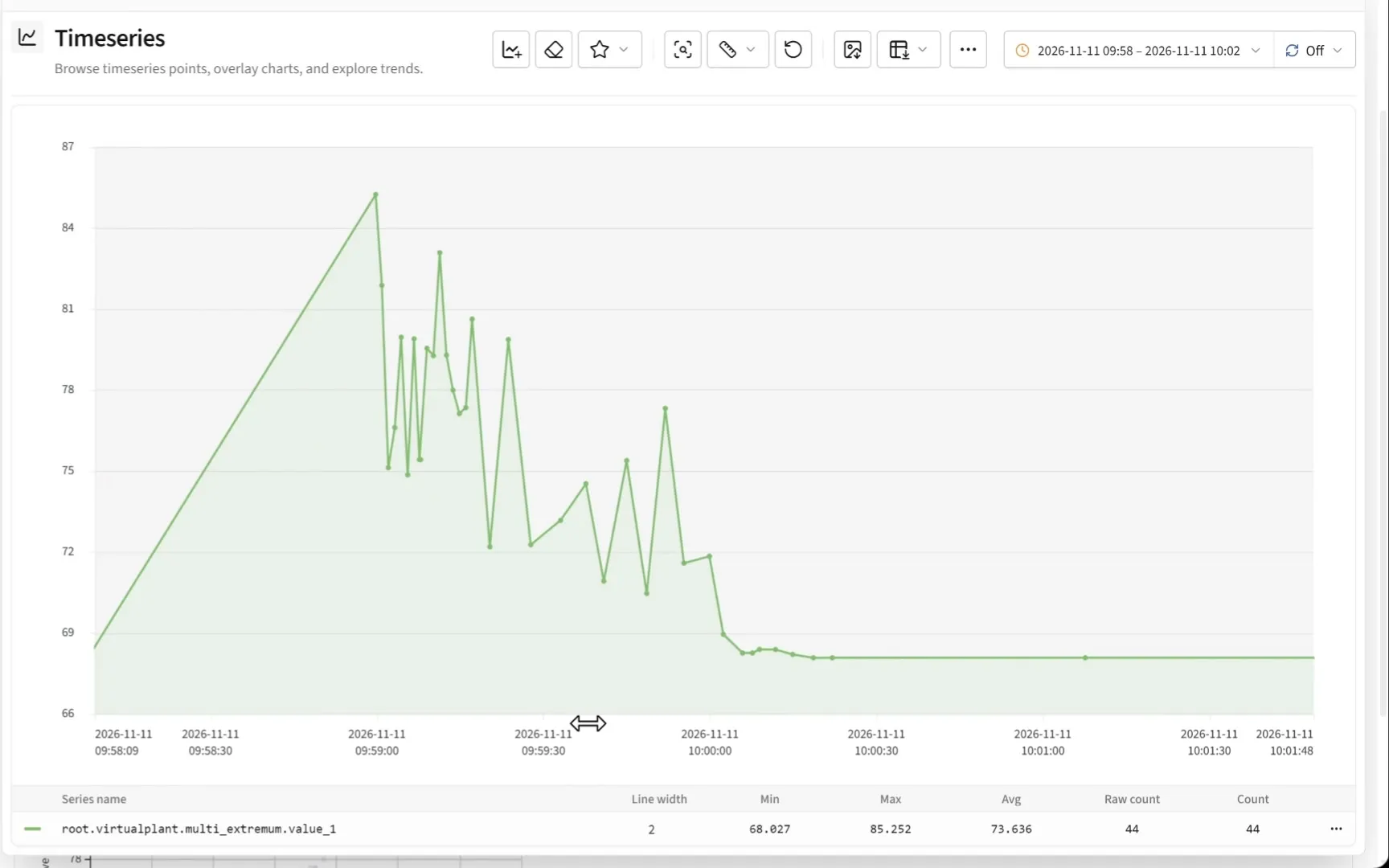
Bring relevant data together to answer three questions: what happened, why it happened, and what to adjust next.
Place related variables in the same time range instead of switching between multiple views.
Combine iteration records with field data to understand the process conditions behind each result.
Use reviews to refine parameter bounds, evaluation objectives, and search budgets in later tasks.
The demo covers tuning records and analytics, custom time-series analysis, monitoring, and report navigation. It uses actual product interfaces and demo data.
Explore the demo and resourcesScope: the test evaluation report shown in the video is available only for simulation tuning, not for live-site online tuning.
Watch the product demo to explore the complete workflow from objective setup and parameter adjustments to settling and evaluation. When the online trial opens, you can experience firsthand how OptimLight makes every adjustment evidence-based, traceable, and reusable.
The online trial is not yet available